
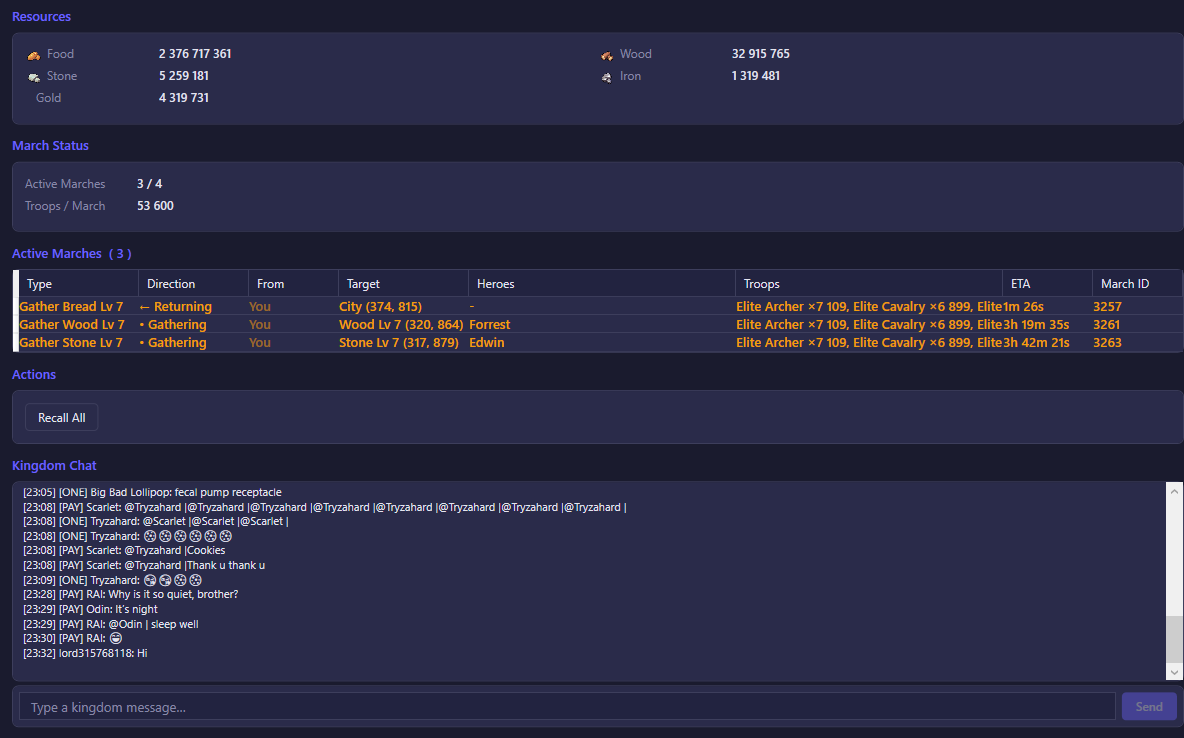
The Resources / Map view brings together three things about your city and the world around it: your stockpiled resources, every march you (or a rally you've joined) currently have out on the map, and the kingdom chat channel — all in one screen.
What you see
Resources shows your city's current stock of Food, Wood, Stone, Iron, and Gold, read directly from your account's live resource totals.
March Status shows two numbers: Active Marches, your current marches out of your account's maximum march slots (for example "2 / 5"), and Troops / March, the maximum number of troops a single march can carry with your current buffs and research.
Active Marches is a table listing every march currently in progress — outbound, returning, gathering, or a rally you've joined — refreshed every second:
- Type — what the march is doing: gathering a resource node, attacking a monster, joining a rally, escorting, and so on.
- Direction — whether the march is currently heading out, returning, or gathering in place, shown with an arrow.
- From — who the march belongs to. Your own marches show "You"; a rally you've joined shows the rally leader's name once it's known (otherwise "Ally rally").
- Target — the destination: a set of map coordinates, or the target city if you're attacking one.
- Heroes — which heroes are leading the march.
- Troops — the troop types and counts in the march. If any of them are wounded, the wounded count is shown alongside the total.
- ETA — time remaining until the march reaches its next milestone (arrival, return, or completion).
- March ID — the march's internal identifier, useful for support requests.
This table is empty whenever the account has no marches out — which is normal between actions, not a sign of a problem. Once the bot sends troops out (gathering, attacking, joining a rally, and so on) or the account is connected with existing marches, rows appear here automatically.
Kingdom Chat shows the kingdom-wide chat channel, with each line prefixed by the sender's alliance tag (if any), name, VIP level, and timestamp.
What you can do
- Recall All — recalls every currently recallable march back to your city. This is the same as manually tapping "Recall" on each march in-game; it's disabled when there are no active marches or the account isn't connected.
- Recall this March (right-click a row) — recalls just that one march. It's hidden for march types that the game itself doesn't allow recalling, such as truck escorts, banquet runs, or pet-catching marches — the same restriction that applies to the swipe-to-recall gesture in the game app. If the march is already returning, recalling has no effect; if it's outbound and can't be recalled directly, the bot needs an Expedition item in your inventory to force it back — without one, the recall is skipped.
- Kingdom Chat — type a message in the box and press Send (or hit Enter) to post it to the kingdom channel, exactly as if you'd typed it in the game.