
Connection controls how this account logs in and stays connected, and lets you route its traffic through a proxy.
The values in the screenshots below are one account's configuration, not the defaults. Each option's default is listed in the tables.
Connection
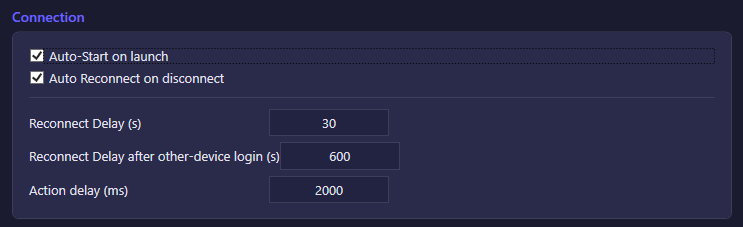
| Option | What it does | Default |
|---|---|---|
| Auto-Start on launch | Automatically connects this account when the app starts, instead of waiting for you to start it manually. | On |
| Auto Reconnect on disconnect | Automatically reconnects the account after it drops. | On |
| Reconnect Delay (s) | How long to wait before the first reconnect attempt after a disconnect. | 30 |
| Reconnect Delay after other-device login (s) | Separate, longer delay used specifically when the server kicks the account because someone logged into the same account elsewhere (e.g. your phone). Kept apart from the normal reconnect delay so the bot doesn't immediately fight a session you're using yourself. | 600 |
| Action delay (ms) | Minimum time between commands sent to the server — a rate limiter, not a network timeout. | 2000 |
Proxy
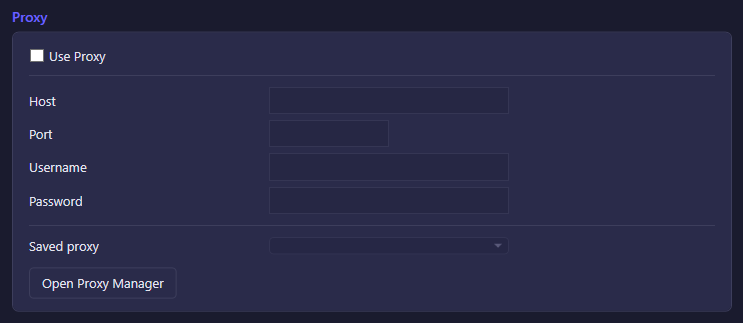
| Option | What it does | Default |
|---|---|---|
| Use Proxy | Routes this account's connection through the proxy configured below instead of your direct connection. While off, the Host/Port/Username/Password fields are disabled. | Off |
| Host / Port / Username / Password | The proxy's address and, if required, its credentials. Password is entered separately and not stored in plain view. | — |
| Saved proxy | Picks a previously saved proxy configuration to fill the fields above instead of entering one by hand. | — |
| Open Proxy Manager | Opens the dedicated Proxy Manager window, where proxies can be imported in bulk, checked for latency, and distributed across multiple accounts. | — |