
The App Settings window holds preferences for the Kingshot Bot client itself, not for any particular game account. These settings apply globally, regardless of how many accounts you have or which one is selected — they're separate from the per-account settings found in each account's own Settings tab.
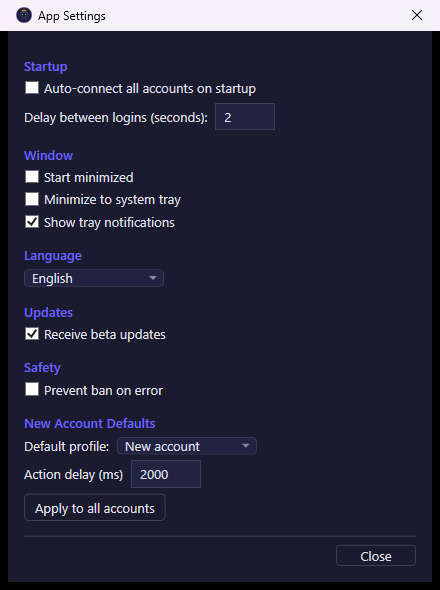
What you see
The settings are grouped into sections:
- Startup — options for what happens when the client launches.
- Window — how the client's main window behaves.
- Language — the interface language.
- Updates — which release channel the client updates from.
- Safety — a client-wide safety default.
- New Account Defaults — values automatically applied to accounts you add later.
What you can do
- Auto-connect all accounts on startup — when enabled, every saved account automatically connects and starts running as soon as the client opens, instead of waiting for you to connect them manually.
- Delay between logins (seconds) — when auto-connecting multiple accounts at startup, this sets the pause between each account's login (0–60 seconds), so accounts don't all sign in at the exact same moment.
- Start minimized — the client starts minimized instead of showing its window right away.
- Minimize to system tray — minimizing the window sends it to the system tray instead of the taskbar.
- Show tray notifications — enables/disables tray popup notifications from the client.
- Language — changes the interface language. Changing it requires restarting the app, and the client will prompt you to restart immediately.
- Receive beta updates — switches the client to the beta update channel, so you get pre-release versions early (these may contain bugs).
- Prevent ban on error — the default value used for a safety option that disconnects an account and logs a warning if it starts hitting repeated errors in a short time. This client-wide toggle is also pushed immediately to every account currently loaded, not just newly created ones.
- Default profile — the settings profile automatically applied to every new account you add, so you don't have to configure it by hand right after adding it. Choose "(None)" to use blank default settings for new accounts instead.
- Action delay (ms) — the default pause the bot waits between actions for an account, used as a starting point for accounts that haven't set their own value.
- Apply to all accounts — immediately pushes the current Action delay value to every account you already have, overwriting their individual action-delay settings with this one.
- Close — closes the window. Each setting is saved as soon as you change it, so there's nothing to confirm on close.