
The Research view shows what your Research Lab is currently working on and every technology you've completed so far, organized into the game's three research trees. Like Buildings, it's a status display — it doesn't let you queue new research directly.
What you see
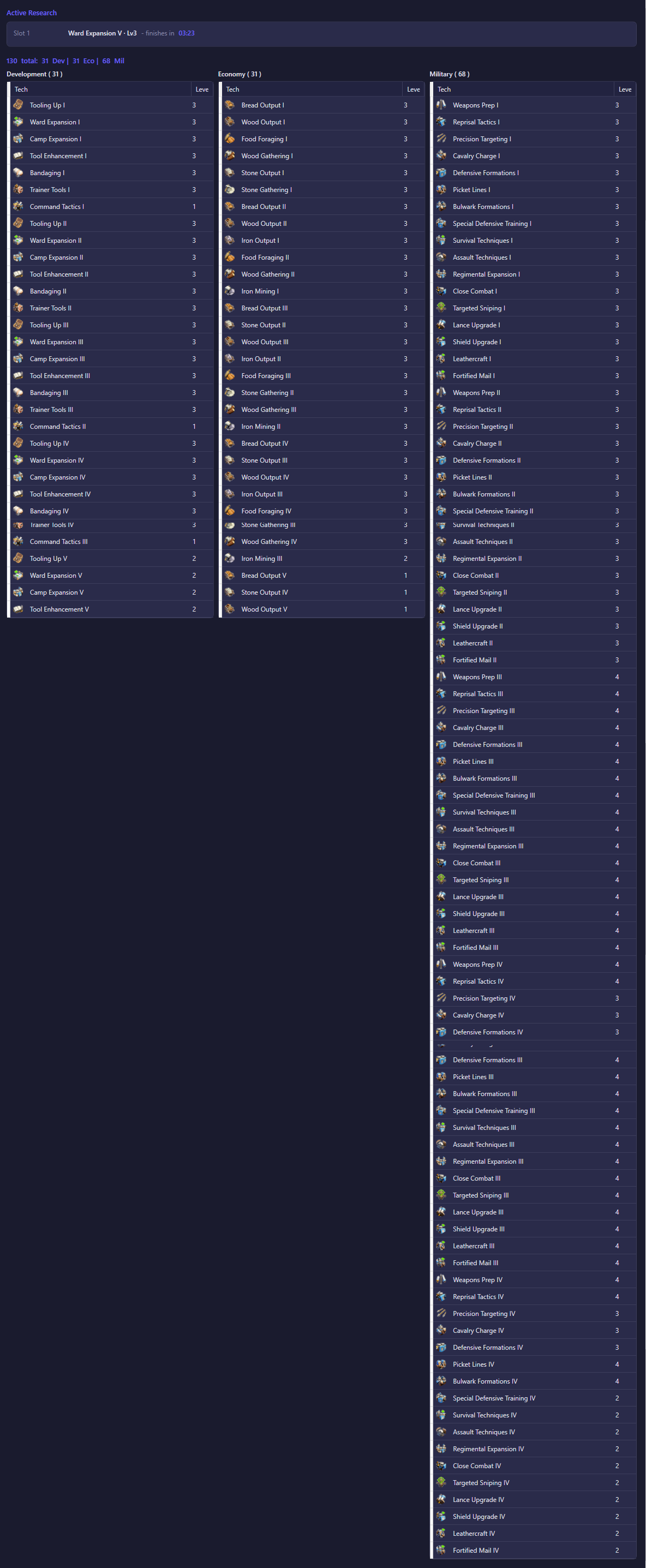
Active Research shows what's currently being researched:
- Slot 1 — the technology and level currently researching, with a countdown to completion. If nothing is being researched, this section shows "No research in progress" instead.
- Slot 2 — a second, simultaneous research slot (available with certain VIP levels or boosts) shown only when it's actually in use, along with its own countdown.
Below that, a summary line totals your completed research count and breaks it down by tree ("X total: Y Dev | Z Eco | W Mil").
The three columns — Development, Economy, and Military — each list every technology you've researched to at least level 1 in that tree, with its icon, name, and current level. A technology only appears once you've researched it; it isn't listed as a locked or "not yet researched" placeholder.
All of this is empty until the account connects and its research data has been read, after which it reflects your account's real research progress.
What you can do
This view has no controls — it's read-only. Starting or changing research is done in the game itself (or through the bot's own research automation, if configured elsewhere in Settings); this screen exists purely to let you check research progress at a glance.