
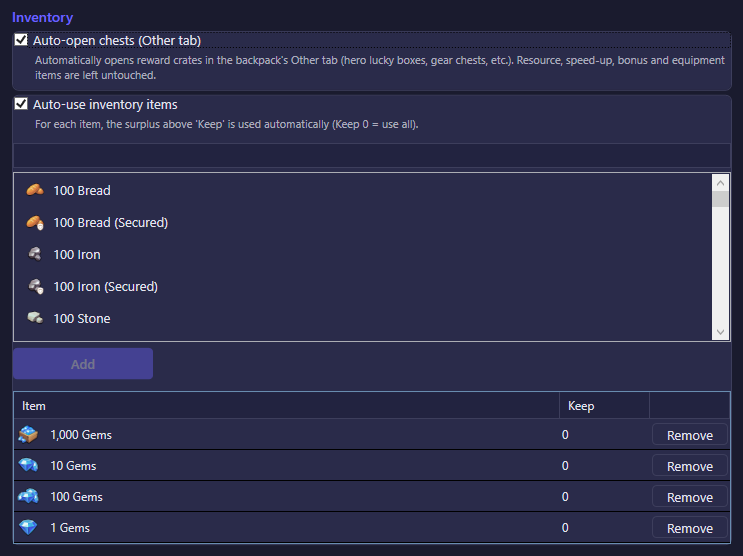
The Inventory tab automates two backpack chores: opening reward chests, and using up specific items you pick, while keeping a reserve of each. It lives in Settings → General → Inventory.
The values in the screenshot are one account's configuration, not the defaults. Each option's default is listed below.
Inventory
| Option | What it does | Default |
|---|---|---|
| Auto-open chests (Other tab) | Automatically opens reward crates found in the backpack's "Other" tab — hero lucky boxes, gear chests, and similar direct-grant chests. Resource, speed-up, bonus, and equipment items are left untouched, and chests that require you to pick a reward are skipped. Off by default — opt in explicitly. | Off |
| Auto-use inventory items | Master switch for the item list below: uses up the surplus of each listed item, keeping only the quantity you set. Off by default — opt in explicitly. | Off |
| Search box + Add | Search the backpack for an item, select one or more, and add them to the list below to start auto-using them. | List is empty by default. |
| Keep (per-item field) | For each item in the list, the bot uses everything above this quantity and leaves the rest untouched. 0 means use the entire stack. |
0 per new item |
| Remove | Removes an item from the auto-use list, stopping automation for it. | — |