
The Schedulers tab has two unrelated features: Character Rotation (cycling between multiple characters on the same account) and the Offline Schedule (putting the account offline during set hours of the day, then bringing it back automatically). Character Rotation is a paid-plan feature — a lock banner appears above this tab if your plan doesn't include it.
Character Rotation

| Option | What it does | Default |
|---|---|---|
| Enable automatic character rotation | Master switch. While off, the bot stays on whichever character is currently active. | Off |
| Timer interval (min) | How long the bot stays on one character before switching to the next one in the list below. Floored at 5 minutes regardless of what you type, as an anti-spam safety limit. | 60 |
Characters in Rotation
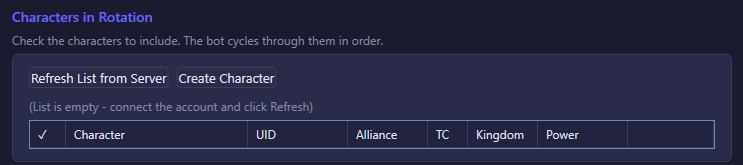
Check the characters to include; the bot cycles through the checked ones in list order once the interval elapses. Refresh List from Server re-pulls your character list (useful after creating a new one elsewhere). Create Character opens a picker to create a new character on a chosen kingdom — the server assigns the name and the bot switches to it automatically once created. Each row also has a Switch button to jump to that character immediately, without waiting for the timer. How many characters you're allowed to check is capped by your plan; a message above the table tells you when you've hit that cap.
Offline Schedule

| Option | What it does | Default |
|---|---|---|
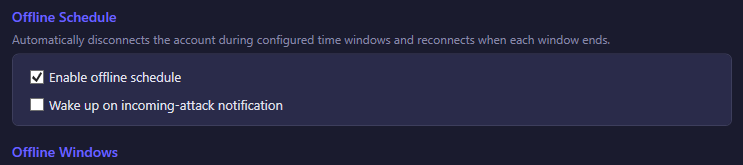
| Enable offline schedule | Master switch for the whole feature. While off, none of the windows below are enforced and the account stays online (or offline) exactly as you'd expect from every other setting. | Off |
| Wake up on incoming-attack notification | While the account is asleep inside a window, keeps listening for a push notification about an incoming attack. If one arrives, the bot reconnects to defend, then goes back to sleep once the threat clears (or after a safety time cap, in case the wake was a false alarm). Needs Enable offline schedule on to matter. | Off |
The time basis is your computer's local clock, not the game server's clock. Windows are compared against the local time of the machine running the bot — if you run several accounts across different server regions, they all sleep according to the same wall-clock time on your PC, not each account's in-game server time. Moving the bot to a different timezone (or a daylight- saving shift) changes when windows fire without you touching the settings.
What happens at a window boundary: when a window starts, the bot stops its automation loops and disconnects cleanly — it does not try to rush an in-progress action to completion first, it just stops and drops the connection. When a window ends, the bot reconnects and resumes automatically. If the connection attempt is rejected (for example a server-side device-slot limit), the bot logs it and quietly retries on the next check rather than getting stuck.
Offline Windows
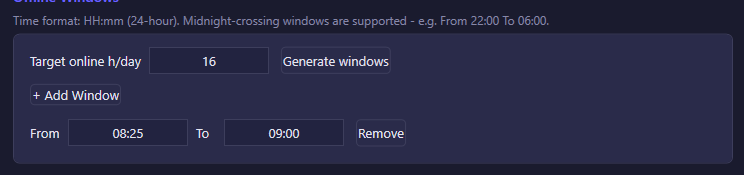
| Option | What it does | Default |
|---|---|---|
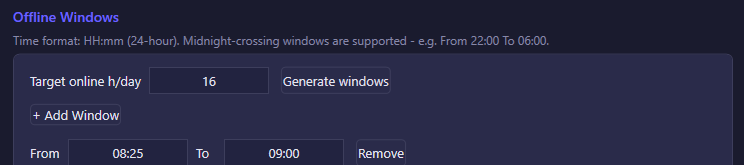
| Target online h/day | How many hours per day you want the account online, on average. Used only by Generate windows below — it doesn't do anything on its own. | 16 |
| Generate windows | Replaces the current list of windows with a freshly randomized one: one long "sleep" block plus a few short daytime micro-pauses, sized around your target online hours (with a bit of random jitter so a whole fleet of accounts doesn't sleep in perfect sync). Each click re-rolls a new random layout. | — |
| + Add Window | Adds one manual window (default 22:00 to 08:00) that you can edit directly. |
— |
Each window has From / To fields in HH:mm, 24-hour, local time and a Remove button. Any time the current local clock falls inside a window, the account is offline; outside all windows, it's online. Midnight-crossing windows are supported — e.g. From 22:00 To 06:00 means "offline from 10pm to 6am the next day," not an invalid range. You can mix manual windows with a generated set; Generate windows replaces the whole list, it doesn't merge with manual entries.