
The Events tab lists the game's timed activities — things like Alliance Mobilization, World Boss, and seasonal events — so you can see at a glance what's currently running, what's coming up, and how close each one is to being finished.
What you see
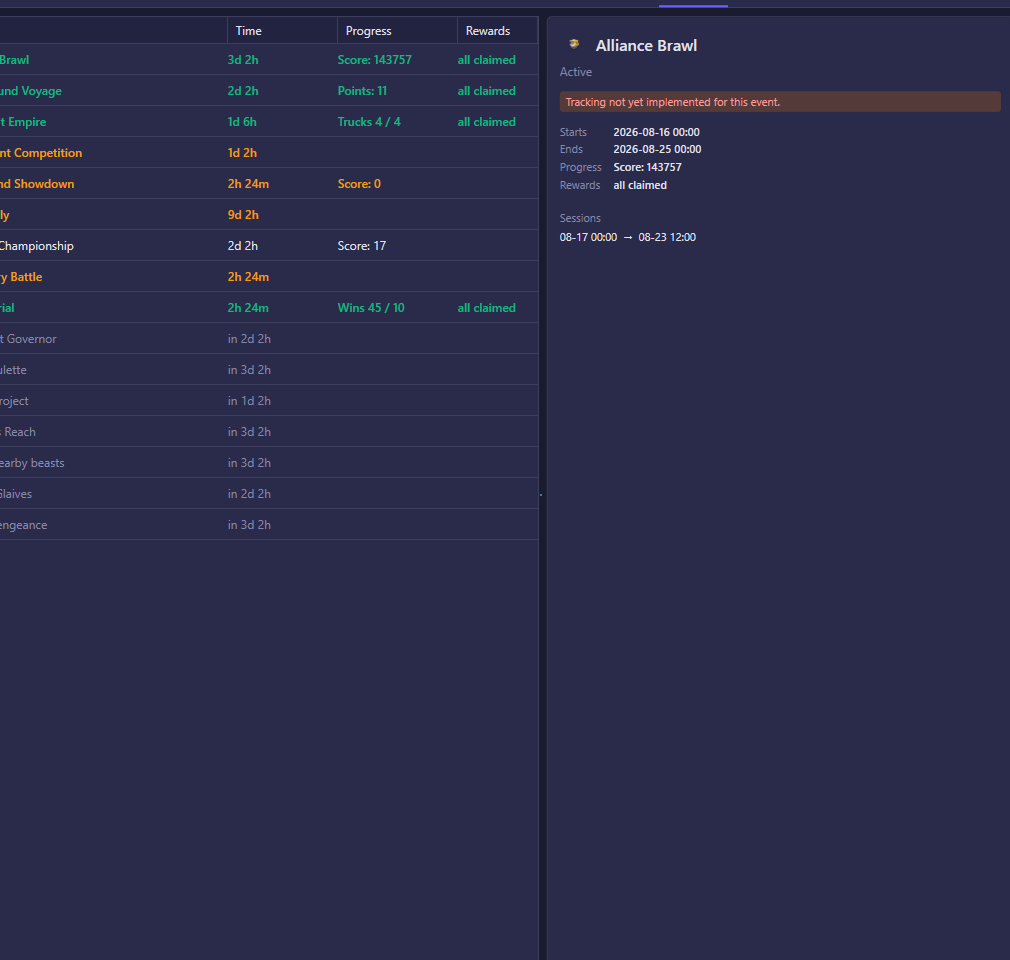
The left side is an agenda list with one row per event:
- Status — Upcoming, Active, Settling, or Ended. Active rows are shown in bold amber; completed ones (all rewards already claimed) turn green; upcoming ones are dimmed.
- Event — the event's icon and name.
- Time — a countdown. For an upcoming event this shows how long until it starts (e.g. "in 2d 0h"); for a running one it shows how long is left.
- Progress — your current standing in the event (points, wins, days completed, and similar, depending on the event type).
- Rewards — how many reward tiers you've claimed out of the total, or "all claimed" once you're done.
Selecting a row opens the detail pane on the right, which repeats the icon, name, and status, then adds:
- Starts / Ends — the exact start and end date and time.
- Progress and Rewards — the same figures as the list, spelled out in full.
- Sessions — some events run in several separate time windows rather than one continuous block; this lists each window's start and end time.
If an event's automatic tracking isn't wired up yet, the detail pane shows a small notice that tracking for that particular event isn't implemented — the event still appears, but its progress and rewards won't be tracked.
If nothing is scheduled, the tab simply says there are no events in the next 7 days. Once the account connects and the game reports its active/upcoming events, the list fills in automatically — this tab does not need to be refreshed manually.
What you can do
This tab is for monitoring only — there are no buttons to trigger. Click a row to inspect its details; the bot handles participating in and claiming events on its own according to your automation settings elsewhere in the app.