
Alliance Mobilization hands out a personal quest one at a time; completing it earns points and lets you pull a new one. This tab controls which quests the bot is willing to accept, how it spends its daily "attempts" (chances to pull a new personal quest), and — for R4+ officers — how it helps curate the shared alliance quest board.
Master Switches

These four controls sit above everything else on the tab and govern personal missions as a whole, independently of the per-mission grid further down.
| Option | What it does | Default |
|---|---|---|
| Complete Mission? | Master switch: accepts, completes, and claims personal mobilization missions. While off, the bot leaves your current quest alone entirely. | On |
| Send Mail to Player | Sends a private message to the named player when the bot encounters a quest it can't complete itself, so a human can step in. Requires typing an exact player name. | Off |
| Non Automated Only? | When notifying, only mail about quests the bot genuinely can't automate rather than every quest. | On |
| Buy Extra Mission? | Spends diamonds to buy extra personal-quest attempts beyond the one free daily attempt. The free daily attempt is always grabbed automatically regardless of this toggle — this only controls paid extras. | Off |
Personal Missions
| Option | What it does | Default |
|---|---|---|
| Complete Mission? | Master switch: accepts, completes, and claims personal mobilization missions. While off, the bot leaves your current quest alone entirely. | On |
| Send Mail to Player | Sends a private message to the named player when the bot encounters a quest it can't complete itself, so a human can step in. Requires typing an exact player name. | Off |
| Non Automated Only? | When notifying, only mail about quests the bot genuinely can't automate (see "Automated?" column below) rather than every quest. | On |
| Buy Extra Mission? | Spends diamonds to buy extra personal-quest attempts beyond the one free daily attempt. The free daily attempt is always grabbed automatically regardless of this toggle — this only controls paid extras. | Off |
| (attempts dropdown) | How many paid attempts to allow per day, shown with their cumulative gem cost (e.g. "3 more ≈ 900 gems"). Only spent while Buy Extra Mission? is on. | Free only (0) |
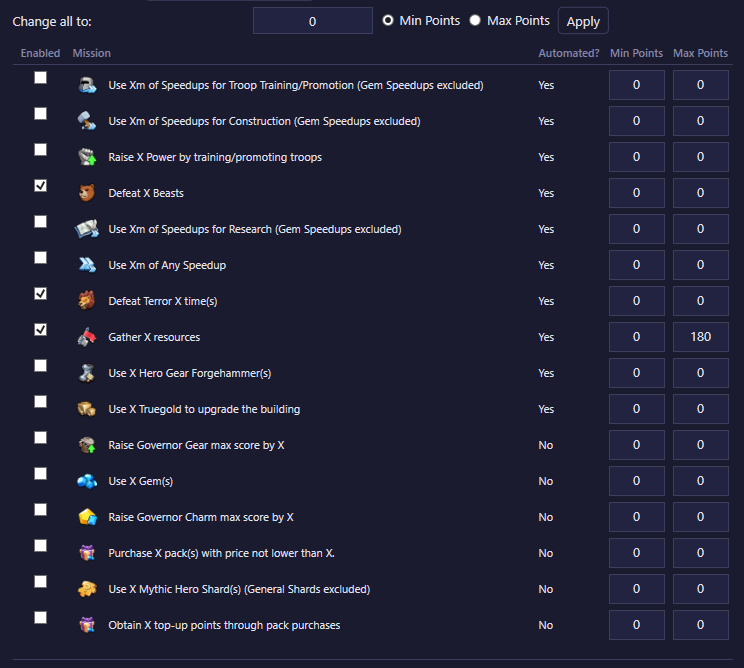
The selection rule: each row in the grid below is one mission type. Enabled means the bot will accept that mission type when it's offered; if it's unchecked, the bot leaves an offered quest of that type alone (and it becomes eligible for a free reroll). Min Points / Max Points filter by that specific offer's point reward — a 0 bound means no limit on that side. For example, Min 50 / Max 0 only accepts that mission when the reward is 50 points or higher; both at 0 accepts any reward size for that mission, as long as it's enabled. The Automated? column tells you whether the bot can actually complete that mission type itself (some, like "purchase a pack" or "use gems," are marked No because they need real money or manual play — the bot will never enable a mission you can't actually earn points from).
Change all to: sets every currently-enabled row's Min or Max (pick with the radio buttons) to one value in a single click — a shortcut for retuning your whole mission list at once instead of editing every row.
R4+ Rule to auto clear
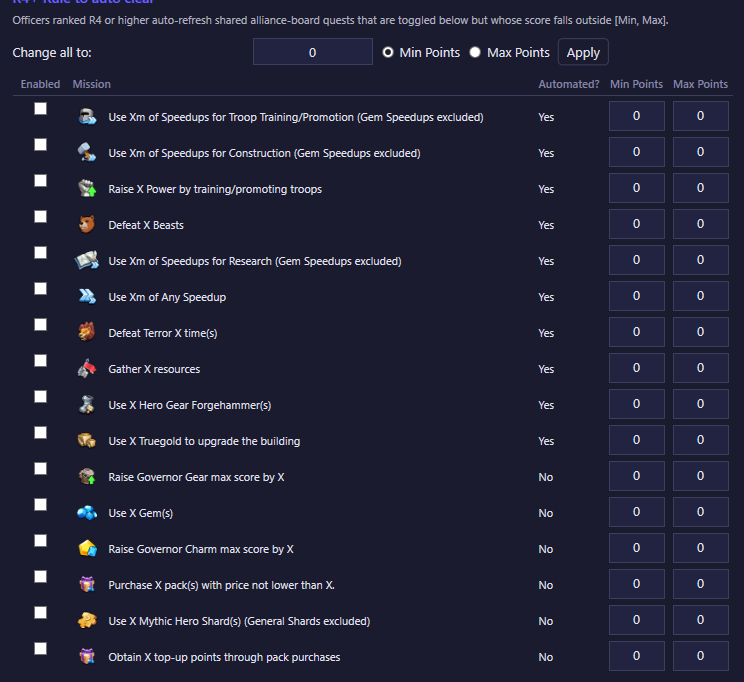
This is a separate grid with the same Enabled / Min Points / Max Points columns and its own Change all to bulk-apply, but it targets the shared alliance board instead of your personal quest — and it only does anything if you're ranked R4 or higher in your alliance.
For a mission type enabled here, if a currently-offered slot on the shared board is outside the configured [Min, Max] point range, an R4+ officer auto-refreshes that slot off the board so someone else gets a better-value quest to pick up. A mission type left unchecked here is left alone on the board, no matter its point value. This is a curation tool for the alliance's shared board — it has no effect on which personal quest you yourself accept (that's governed entirely by the Personal Missions grid above).