Automate the daily grind — sign-ins, mail, VIP maintenance, the vendor shop, Truegold purification, and the bank vault.
·4 min read
The Daily tab covers the routine chores you'd otherwise do by hand every day: collecting mails and rewards, keeping VIP topped up, restocking from the Vendor shop, purifying gear in the Truegold Crucible, and running the bank vault. It lives in Settings → General → Daily.
The values in the screenshots are one account's configuration, not the defaults. Each option's default is listed below.
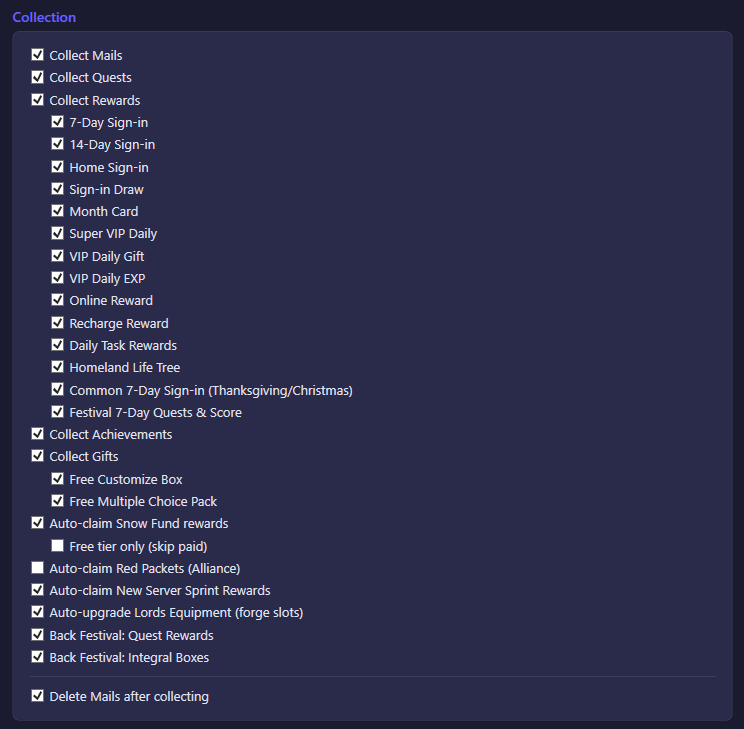
Collection
Option
What it does
Default
Collect Mails
Reads and collects the rewards attached to mails.
On
Collect Quests
Completes and claims finished quests.
On
Collect Rewards
Claims the general daily reward pool (this master switch gates the individual sign-in rewards below it).
On
7-Day Sign-in
Claims the 7-day sign-in calendar reward.
On
14-Day Sign-in
Claims the 14-day sign-in calendar reward.
On
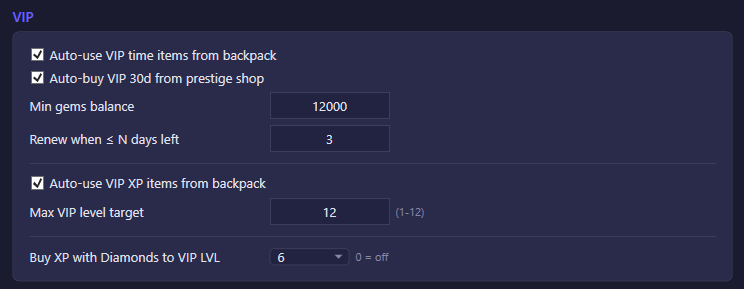
VIP
Option
What it does
Default
Auto-use VIP time items from backpack
Spends VIP time items to extend your VIP subscription before it expires, in priority order 30-day → 7-day → 24-hour.
On
Auto-buy VIP 30d from prestige shop
Buys a 30-day VIP pass with gems from the prestige shop once VIP is close to expiring.
On
Min gems balance(field)
The bot never buys VIP time if doing so would drop your gem balance below this amount.
12000
Renew when ≤ N days left(field)
How many days of VIP must remain before the bot tries to renew it. 0 only acts once VIP has fully expired.
3
Auto-use VIP XP items from backpack
Spends VIP XP items to level up your VIP rank, stopping once the level cap below is reached.
On
Max VIP level target(field)
VIP XP items stop being used once your VIP level reaches this value.
11
Auto-upgrade Lords Equipment (forge slots)
Advances the 6 Lords Equipment forge slots one level at a time whenever a slot is affordable. This consumes forge materials (Satin / Gilded Threads / Artisan's Vision).
On
Auto-claim New Server Sprint Rewards
Claims all available New Server Sprint rewards (new-server event only).
On
Back Festival: Quest Rewards
Claims completed quest rewards during the Back Festival (returning-player) event.
On
Back Festival: Integral Boxes
Claims integral (points) boxes during the Back Festival event.
On
Delete Mails after collecting
After collecting a mail's rewards, also deletes it. This keeps the inbox from filling up so new server notifications always have room to arrive.
On
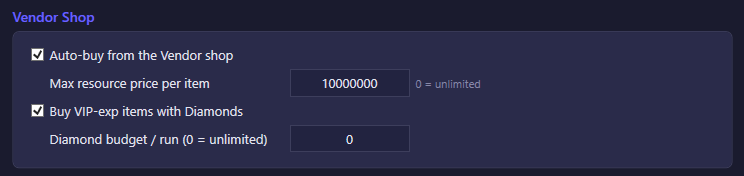
Vendor Shop
The Vendor shop trades warehouse resources (Meat/Wood/Coal/Iron) for backpack items, and can also sell VIP-exp items for Diamonds. It includes a few free manual refreshes per day before further refreshes start costing gems — the bot only uses the free ones.
Option
What it does
Default
Auto-buy from the Vendor shop
Master switch: buys available resource-exchange goods from the Vendor shop.
On
Max resource price per item(field)
Skips any offer whose resource cost is above this amount. 0 removes the cap.
10,000,000
Buy VIP-exp items with Diamonds
Also buys VIP-exp consumables when the shop offers them, paid for with Diamonds.
On
Diamond budget / run (0 = unlimited)(field)
Caps how many Diamonds are spent on VIP-exp items per run. 0 means no cap — it spends whatever is affordable.
0
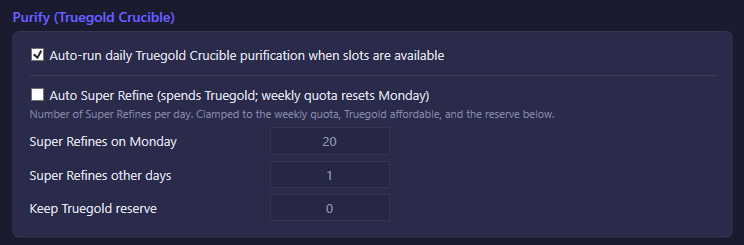
Purify (Truegold Crucible)
Option
What it does
Default
Auto-run daily Truegold Crucible purification when slots are available
Runs the free daily purification whenever a slot is open.
On
Auto Super Refine (spends Truegold; weekly quota resets Monday)
Runs the paid "Super Refine" purification, which spends Truegold. Off by default — it consumes a resource the player may want to save.
Off
Super Refines on Monday(field)
How many Super Refines to run on Monday, when the weekly quota resets. Actual count is clamped to the remaining weekly quota, Truegold you can afford, and the reserve below.
20
Super Refines other days(field)
How many Super Refines to run on any other day of the week. Same clamping applies.
1
Keep Truegold reserve(field)
Super Refining never spends Truegold below this amount. 0 means no reserve — spend freely.
0
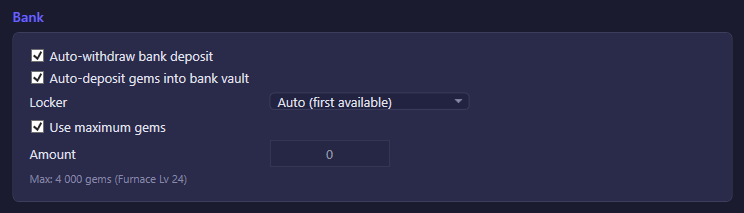
Bank
The Bank vault locks up gems (Diamonds) for a fixed term in exchange for a payout when the deposit matures.
Option
What it does
Default
Auto-withdraw bank deposit
Withdraws a matured bank deposit as soon as it's ready.
On
Auto-deposit gems into bank vault
Starts a new deposit once the vault is empty.
On
Use maximum gems
Deposits as many gems as the selected locker allows (capped by how many gems you actually hold), instead of a fixed amount.
On
Amount(field)
The exact amount to deposit when "Use maximum gems" is off. Only used while that option is unticked.
0 (only applies with "Use maximum gems" off; falls back to the locker's own maximum, or 500, if left at 0)