
The Army tab (Settings → Army) controls everything that trains, heals, or fights with your troops: barrack training and hospital healing, plus five automated combat modules — Arena, World Boss, Climb Tower, Tower Defence, Terror (Rally), and Beast. Several of these modules spend real resources or commit soldiers to combat, so the notes below call out what is actually being risked or spent, not just what the checkbox label says. Screenshots show one account's current configuration — read the "Default" column for what a fresh install ships with, not what appears in the picture.
Training
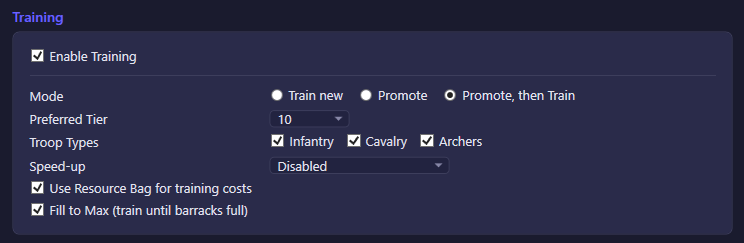
Controls how idle barracks are filled.
| Option | What it does | Default |
|---|---|---|
| Enable Training | Master switch for barrack automation. | On |
| Mode (unlabeled combo box) | Chooses the strategy for idle barracks: Train new always recruits fresh troops at the preferred tier (spends raw resources); Promote only upgrades existing lower-tier troops to the preferred tier (cheaper, spends Material Hub, idles once nothing is left to promote); Promote, then Train upgrades first and falls back to fresh recruits once there's nothing left to promote, so barracks never sit idle. | Train new |
| Infantry / Cavalry / Archers | Which troop types the bot is allowed to train or promote. At least one should stay checked or training has nothing to do. | All three on |
| Use Resource Bag for training costs | Lets the bot draw resources from the Resource Bag (bag items) to pay training costs instead of only base warehouse resources. | Off |
A "Preferred Tier" dropdown and a training speed-up dropdown also live in this section (not pictured): the tier picker sets which troop tier is trained/promoted toward, and the speed-up picker chooses whether speed-up items are spent to finish training queues instantly (never, type-specific only, or type-specific plus general speed-ups).
Hospital
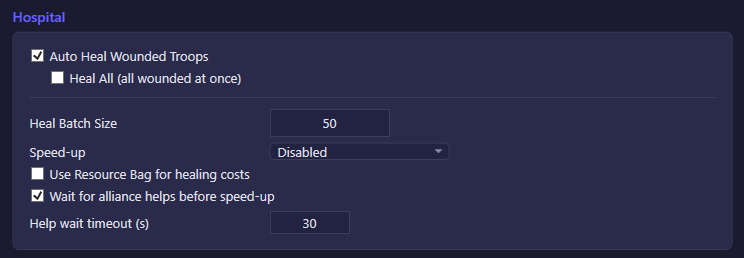
Healing lives in the same settings group as Training internally, but is shown as its own section.
| Option | What it does | Default |
|---|---|---|
| Auto Heal Wounded Troops | Master switch for automatic hospital healing. | On |
| Heal All (all wounded at once) | Sends every wounded troop to the hospital in one request instead of healing in batches. Only active while Auto Heal is on. | Off |
| Use Resource Bag for healing costs | Lets healing costs be paid from the Resource Bag instead of only base resources. | Off |
| Wait for alliance helps before speed-up | Delays sending speed-up items on the heal queue until it has received the maximum possible alliance helps (or the wait timeout below elapses), so free help-time reductions stack before any items are spent. | On |
The unlabeled numeric field in this section is the heal batch size (troops healed per batch when "Heal All" is off; default 100) or, depending on which row the screenshot captured, the alliance-help wait timeout in seconds (default 30). Both fields are plain seconds/count inputs next to their own text labels in the full panel; a heal speed-up mode dropdown (same three-way Disabled/type-only/type+general choice as Training) also sits here.
Arena
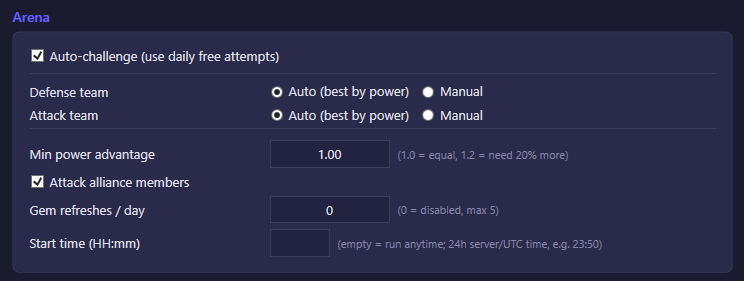
| Option | What it does | Default |
|---|---|---|
| Auto-challenge (use daily free attempts) | Spends all of today's free Arena challenge attempts automatically. | On |
| Attack alliance members | Allows the auto-challenge opponent pool to include members of your own alliance. | Off |
The unlabeled numeric field is most likely "Min power advantage" — the bot only challenges an opponent if your attack-hero-formation power divided by their defense power is at least this ratio (1.0 = equal power, 1.2 = you need 20% more); this compares hero-formation power only, not full account power. The same section also has a "Gem refreshes / day" counter (0 = disabled, spends gems to reroll the opponent list, max 5) and an optional "Start time (HH:mm, server/UTC)" field that, if set, restricts Arena to run only after that time each day (e.g. "23:50" to spend all attempts right before the daily reset) — leaving it empty means no time restriction. A consecutive-loss stop (default: 2 losses) also protects rank points if the power filter is too loose, though it is not exposed as a separate labeled field in the screenshot inventory.
World Boss
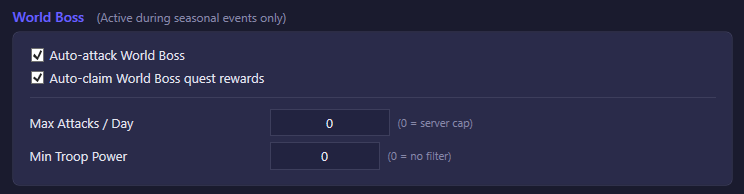
World Boss is a seasonal-event feature — its controls only do anything while the event is active.
| Option | What it does | Default |
|---|---|---|
| Auto-attack World Boss | Automatically attacks the World Boss when the event is live. | On |
| Auto-claim World Boss quest rewards | Automatically claims World Boss quest rewards. | On |
The unlabeled numeric field is one of two fields in this section: "Max Attacks / Day" (0 = use the server's own daily cap) or "Min Troop Power" (0 = no power filter, attack regardless of formation power). Both default to 0, i.e. no extra limit beyond what the server itself enforces.
Climb Tower
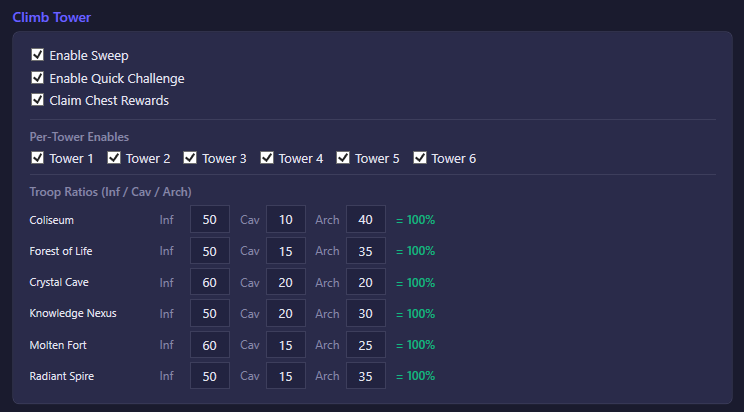
| Option | What it does | Default |
|---|---|---|
| Claim Chest Rewards | Automatically claims cumulative Climb Tower chest rewards once unlocked by total floors passed. | On |
| Enable Quick Challenge | Automatically runs quick-challenge attempts, which reuse a formation you've already saved on the server. Does nothing until you've manually saved a formation at least once. | On |
| Enable Sweep | Automatically sweeps (auto-clears) previously cleared floors each week, one sweep per tower. | On |
| Tower 1 – Tower 6 | Per-tower on/off switches; only checked towers are worked by Quick Challenge/Sweep. | All six on |
A manual "Enable Challenge" toggle also exists in the settings model for towers without a saved formation yet, but defaults to off because it consumes soldiers on every attempt (the code comment explicitly calls this out); it is not part of the pictured control set. The unlabeled edit field(s) belong to the per-tower troop-ratio grid below the checkboxes — Infantry/Cavalry/Archer percentage weights used to build each tower's attack formation (defaults: e.g. Tower 1 50/10/40, Tower 3 60/20/20, etc.); these are relative weights, not required to sum to 100.
Tower Defence
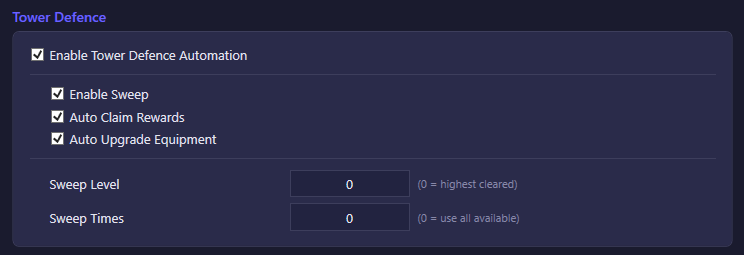
| Option | What it does | Default |
|---|---|---|
| Enable Tower Defence Automation | Master switch for the whole Tower Defence module; the other three toggles are disabled unless this is on. | On |
| Auto Claim Rewards | Automatically claims Tower Defence rewards. | On |
| Auto Upgrade Equipment | Automatically upgrades equipment obtained from Tower Defence drops. | On |
| Enable Sweep | Automatically sweeps cleared Tower Defence floors instead of only running fresh battles. | On |
The unlabeled numeric field is one of "Sweep Level" (0 = sweep the highest cleared level) or "Sweep Times" (0 = use all available sweep attempts) — both default to 0, meaning "let the bot pick the maximum."
Terror (Rally)
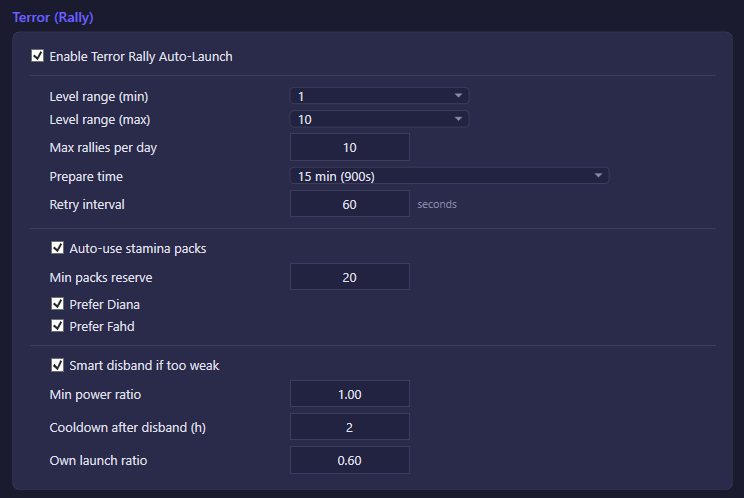
Terror is a rally action: the bot launches an alliance rally on a world-map Terror monster; alliance members can join during the prepare window, and the march (troops from your own city plus any joiners) dispatches when that window ends. This spends stamina and, if the rally launches, commits your soldiers/heroes to the march — the bot doesn't ask per-attempt, it launches or disbands based on the gates below.
| Option | What it does | Default |
|---|---|---|
| Enable Terror Rally Auto-Launch | Master switch. All other Terror controls are disabled unless this is on. | Off |
| Auto-use stamina packs | Automatically consumes stamina packs from inventory when live stamina is too low to launch, keeping at least the "min packs reserve" amount in reserve. | On |
| Prefer Diana | Forces hero Diana into the launch formation when available; her passive reduces the launcher's stamina cost. Forcing a specific hero in can evict a higher-power best-in-type hero, which lowers the estimated launch power (and may make the bot pick a lower Terror level). Not exclusive with "Prefer Fahd" — both can be checked at once. | On |
| Prefer Fahd | Forces hero Fahd into the launch formation; his passive adds march speed. Same trade-off as Diana above. Not exclusive with "Prefer Diana." | On |
| Smart disband if too weak | Shortly before the prepare window ends, checks the rally's actual composition; if allies haven't joined and the rally isn't full/strong enough, the bot cancels it for free (no items spent) and relaunches at the same level with a longer prepare timer. After the maximum number of attempts it drops to a lower level instead. | On |
Numeric/dropdown fields in this section (present in the full panel, only one shown as the unlabeled control above): Level range (min/max, default 1–6, since alliance Terror unlock typically caps at Lv6 even though gamedata supports up to Lv30), Max rallies per day (default 10 — beyond this the server stops granting Special Rewards; set to 3 to just satisfy the daily "Defeat Terror x3" task, or leave at 10 to maximize rewards), Prepare time (how long allies can join before dispatch — longer means more joiners and more combined power), Retry interval in seconds (default 1800 = 30 min, cooldown between rally attempts), Min packs reserve, Min power ratio (default 1.0 — the rally's estimated total power must meet or exceed this fraction of the target's required power before it's allowed to proceed; heroes are excluded from this estimate, so 1.0 already carries a safety margin), Cooldown after disband in hours (default 2 — doubles on each further disband at the same level, capped at the next daily reset), and Own launch ratio (default 0.12 — the fraction of the target's required power that your own march alone must cover before launching; allies are expected to fill the rest during the prepare window).
Beast
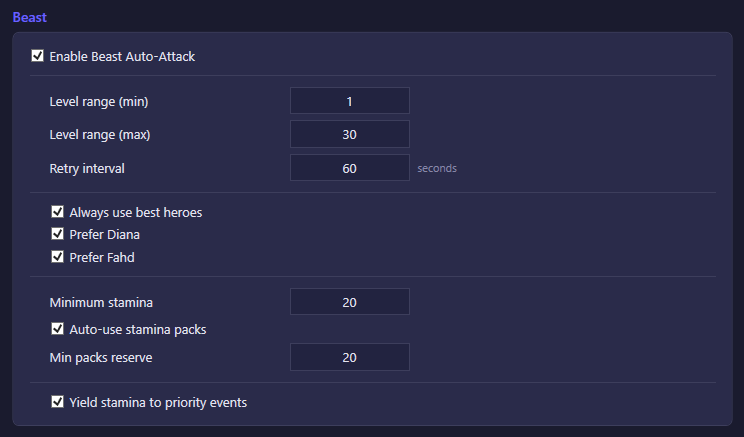
Beast auto-attack sends your own march (troops + heroes) against world-map beast monsters. Unlike Terror, this is a solo attack, not an alliance rally.
| Option | What it does | Default |
|---|---|---|
| Enable Beast Auto-Attack | Master switch. All other Beast controls are disabled unless this is on. | Off |
| Always use best heroes | Automatically fills the attack formation with your highest-power available heroes. | On |
| Auto-use stamina packs | Automatically consumes stamina packs when live stamina is too low to attack, respecting the "min packs reserve" setting. | On |
| Prefer Diana | Forces Diana (hero ID 50008) into the attack formation for her stamina-cost-reduction passive. Not exclusive with "Prefer Fahd." | On |
| Prefer Fahd | Forces Fahd (hero ID 50029) into the attack formation for his march-speed passive. Not exclusive with "Prefer Diana." | On |
| Yield stamina to priority events | When enabled, Beast attacks pause while another stamina-consuming feature — Terror rallies, Icefield Hunter, Champion's Way, Mercenary Glory, or Intelligence Station dispatch — currently has a stamina-worthy action available, so that feature gets first claim on your stamina instead of Beast draining it. This is a shared account-wide setting, not Beast-specific storage, but it only affects the Beast/stamina-grind loop. | Off |
Numeric fields present in the full panel: Level range (min/max, default 1–30, automatically clamped to the server's currently unlocked maximum), Retry interval in seconds (default 60 — a courtesy pause after a march returns before the next one is dispatched), Minimum stamina (default 20 — floor below which the bot won't launch without topping up), and Min packs reserve (default 20 — stamina packs kept in reserve rather than consumed). Troop composition (Infantry/Cavalry/Archer split) is not user-configurable here — the bot sizes it automatically per beast level.