
The Global Settings window lets you manage bot-behavior profiles — saved bundles of the same settings you'd normally configure one account at a time in each account's Settings tab — so you can set them up once and apply them to many accounts in a single click.
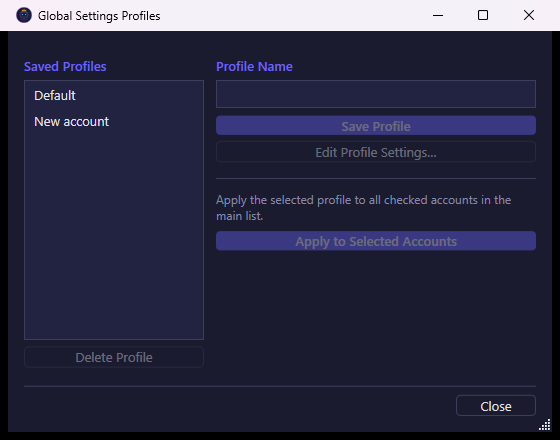
What you see
The window is split in two:
- Saved Profiles (left) — the list of profiles you've created so far. Selecting one loads its name into the field on the right and enables the buttons that act on it.
- Profile Name (right) — a text field for naming a new profile, or renaming the one currently selected, plus the buttons used to create, edit, apply, and delete profiles.
A short reminder text explains that applying a profile affects the accounts you've checked in the main account list, not every account automatically.
What you can do
- Save Profile — saves the current name as a new profile, or overwrites an existing one with the same name. A freshly saved profile starts as a copy of whatever settings it already had (or blank defaults if it's brand new); use Edit Profile Settings… to actually fill it in.
- Edit Profile Settings… — opens the same settings screen used for a single account, but editing it here changes the profile itself rather than any specific account. Confirming the dialog saves your changes back into the profile.
- Delete Profile — permanently removes the selected profile. This only deletes the saved profile; it does not undo settings already applied to accounts.
- Apply to Selected Accounts — applies the selected profile's settings to every account you've checked in the main account list. If no accounts are checked, the bot tells you to select some first. Connection-related settings (like proxy/connection timing) and offline-schedule settings are never overwritten by a profile, since those are meant to stay specific to each account or machine — everything else (gathering, training, building, and the rest of an account's bot behavior) is copied over.
- Close — closes the window without applying anything further.
This window doesn't document what each individual bot-behavior setting does — those are the same settings covered by each account's own Settings tab. Its purpose is purely to save you from repeating that configuration across many accounts.