
The City Admin tab covers the city-government side of the game: enacting Edicts (Laws), handling the post-migration prompt, claiming the Storehouse chest, resolving citizen opinions, and running the Enlistment Office. It lives in Settings → General → City Admin.
The values in the screenshots are one account's configuration, not the defaults. Each option's default is listed below.
Law (Edicts)
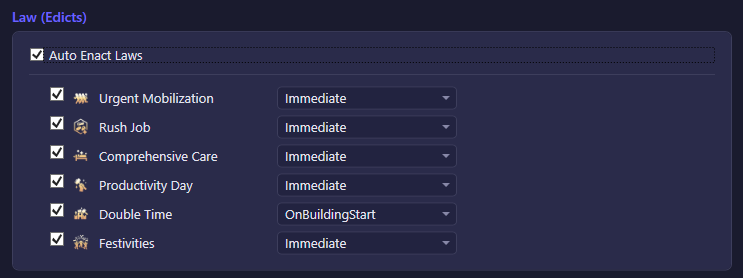
| Option | What it does | Default |
|---|---|---|
| Auto Enact Laws | Master switch for Edict automation. With no laws added to the list below, nothing is enacted even while this is on. | On |
| Per-law list (checkbox + timing dropdown) | Each configured law has its own on/off switch and a timing dropdown that controls when it fires: Immediate (as soon as it's idle and affordable), On building upgrade start, On research start, On building or research start, or Only while Productivity Day is active (useful for a Rush Job law meant to ride the +100% output buff). | List is empty by default — add the laws you want automated. |
Migration

| Option | What it does | Default |
|---|---|---|
| Auto-acknowledge migration first login | Automatically dismisses the "welcome to the new kingdom" notification that appears the first time you log in after migrating. | On |
Storehouse

| Option | What it does | Default |
|---|---|---|
| Auto-claim Gourmet Feast chest (120 Stamina twice/day) | Claims the Storehouse's Gourmet Feast chest. Two slots refill per day, at 00:00 and 12:00 UTC, each worth 120 Stamina. Free reward; unlocks at Town Center Lv.9 with the Storehouse built. | On |
City Satisfaction

| Option | What it does | Default |
|---|---|---|
| Auto-process opinion letters | Automatically resolves citizen opinion letters as they arrive. | On |
| Auto-handle emergency opinions | Automatically resolves emergency opinion pop-ups when they appear. | On |
Enlistment Office
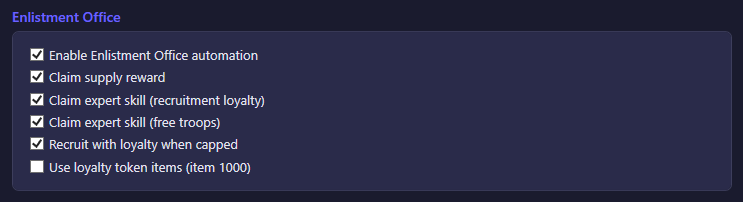
| Option | What it does | Default |
|---|---|---|
| Enable Enlistment Office automation | Master switch: with this off, none of the other Enlistment Office options below run. | On |
| Claim supply reward | Claims the furnace-triggered supply reward whenever it's available. | On |
| Claim expert skill (recruitment loyalty) | Once per day, uses an assigned expert's Enlistment Office skill to claim free recruitment loyalty. Requires an expert who has learned that skill. | On |
| Claim expert skill (free troops) | Once per day, uses an assigned expert's barrack skill to claim free troops. Targets your first built barrack, checking Infantry, then Spear, then Shooter. Requires an expert who has learned that skill. | On |
| Recruit with loyalty when capped | Despite the name, this actually enables loyalty-based recruiting in general: whenever your loyalty points can afford at least the cheapest recruit, the bot spends them to recruit soldiers — it does not wait for loyalty to be fully capped. Turning it off stops all loyalty-based recruiting. | On |
| Use loyalty token items (item 1000) | When recruiting with loyalty, also spends loyalty-token items to cover any shortfall in loyalty points. Only has an effect while "Recruit with loyalty when capped" is on. Off by default since the tokens are a scarce item. | Off |