
The Lords view is a read-only mirror of your in-game player equipment screen. It shows the six equipment pieces worn by your character (your "Lord"), the gems socketed into them, your total combat power broken down by source, and the set bonuses currently active. It's for checking status only — equipping, upgrading, and gem-socketing all happen in-game.
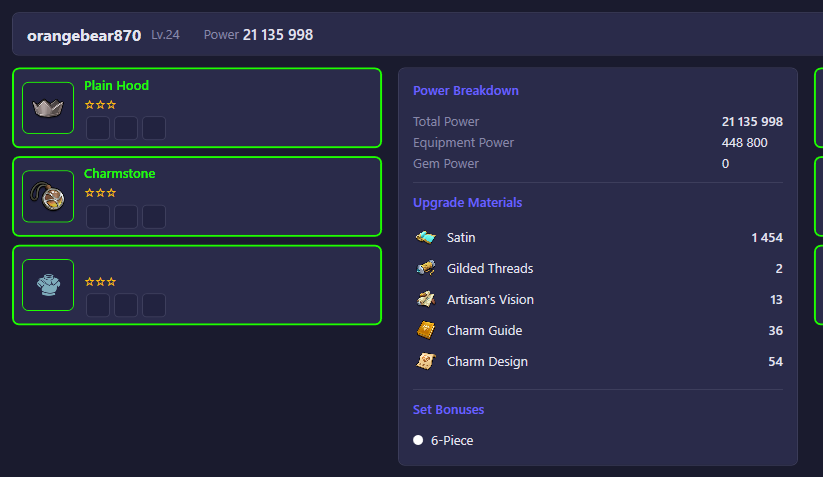
What you see
Header
Your in-game name, your city/furnace level, and your total power.
Equipment slots (left and right columns)
Six cards, one per equipment slot (helmet, armor, weapon, etc.), each showing:
- The piece's icon and name, colored by its quality/rarity.
- Its star rating (up to 3 stars) — how far it has been refined.
- A "T" badge showing its Tempering level, if it has been tempered past the base tier.
- Up to three gem sockets. A filled socket shows the gem's icon and its strengthen level; an empty socket is shown blank.
An empty slot card means that equipment piece hasn't been equipped yet.
Power Breakdown (center panel)
- Total Power — your character's overall combat power from lord equipment and gems.
- Equipment Power — the portion of that power coming from the equipped pieces themselves.
- Gem Power — the portion coming from the gems socketed into those pieces.
Upgrade Materials
A quick tally of the crafting/upgrade materials in your backpack that are used to strengthen equipment and gems (things like fabric, thread, and gem-crafting items), with the quantity you currently own of each.
Set Bonuses
Shows the 3-piece and 6-piece equipment set bonus tiers. Each is colored by the quality tier it currently qualifies for (based on the lowest refinement level among your equipped pieces) and dimmed if you don't have enough matching pieces equipped to activate it yet.
Until the account connects, these panels stay empty — they populate once the bot reads your lord's equipment and power data from the game.
What you can do
This view has no interactive controls — everything shown is pulled directly from your account's live game state. To equip new gear, refine it, socket gems, or temper equipment, do so from within the game itself.